Debug Agent 做运行时诊断,需要知道”哪条执行路径崩溃了”。静态分析能给出代码结构,但不能告诉你运行时实际走了哪些函数、调用了多少次。动态调用图解决这个问题:跑一次 failing test,记录所有函数调用关系,然后压缩到 Agent 能消费的大小。
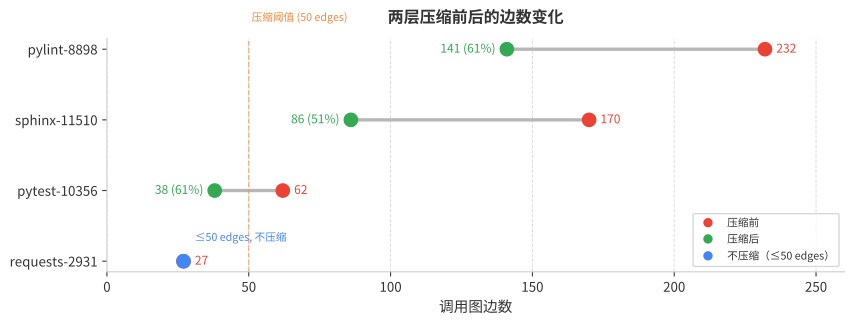
4 个真实 SWE-bench 实例上,两层压缩把最大 232 条边的调用图压到 141 条可读边(39% 削减),同时保留全部 crash path 信息。
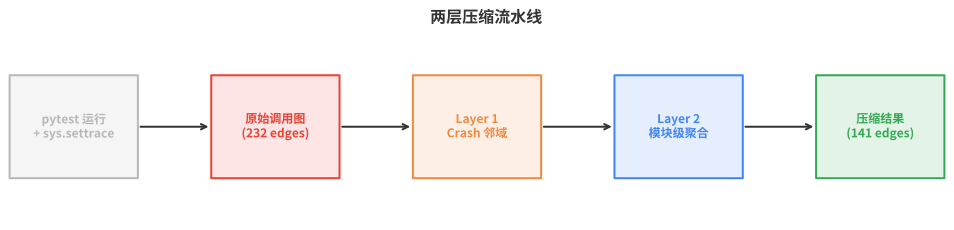
采集:pytest hook + sys.settrace
为什么不直接 settrace 整个进程
最初的方案是用 sys.settrace 覆盖整个 pytest 进程。问题很明显:pytest 自身的启动、收集、fixture setup 等阶段产生大量框架代码调用,噪声超过 60%。而且不同版本的 pytest 内部实现差异很大,8/16 个 SWE-bench 实例直接采集失败。
用 pytest hook 精准控制采集范围
改成用 pytest 的 hook 系统,只在测试函数体执行期间开启 tracer:
class _TraceForgePlugin:
    @pytest.hookimpl(tryfirst=True, hookwrapper=True)
    def pytest_runtest_call(self, item):
        """只在测试函数体执行期间采集"""
        tracer = _TracerEngine()
        tracer.start()        # 开启 sys.settrace
        outcome = yield       # 测试函数在这里执行
        tracer.stop()          # 关闭 sys.settrace
        self._save(tracer)

    @pytest.hookimpl(hookwrapper=True)
    def pytest_runtest_setup(self, item):
        """setup 阶段也采集(防止 setup 失败的盲区)"""
        tracer = _TracerEngine()
        tracer.start()
        outcome = yield
        tracer.stop()
        self._save(tracer)benchmarks/swebench/tracer_wrapper.py
pytest_runtest_setup 是后加的。 最初只 trace call 阶段,结果 Django 实例在 setup 阶段就失败了(缺少 django.contrib.contenttypes 等基线 app),tracer 完全没开启,输出 0 条边。加上 setup hook 后,Django 测试的调用图从 0 → 518 edges。
pytest_runtest_call 而不是 pytest_pyfunc_call。 pytest_pyfunc_call 不会为 unittest.TestCase 和 Django 测试触发,必须用更高层的 pytest_runtest_call。
tracer 内部:只记录用户代码
sys.settrace 的回调在每次函数调用时触发。为了过滤框架代码,在采集时就做判断:
def trace_calls(frame, event, arg):
    filename = frame.f_code.co_filename

    if not _is_user_file(filename):
        return None  # 跳过非用户代码,不继续 trace 子调用

    if event == "call":
        func = frame.f_code.co_qualname  # Python 3.11+ 的限定名
        if call_stack:
            caller = call_stack[-1]
            key = (basename(caller.file), caller.func,
                   basename(filename), func)
            edges[key]["call_count"] += 1
        call_stack.append(FrameInfo(filename, func, frame.f_lineno))

    return trace_callssrc/TraceForge/tracer/_trace_script.py
用户代码判断: 排除 site-packages、/lib/python、以 < 开头的内置路径,只保留 workspace 内的文件。这一层过滤非常有效:在实测中,P0(非用户代码过滤)在 tracer 层面已经完美工作,后续压缩阶段不需要再做。
错误信息直接从 pytest 获取
旧方案从 stderr 文本解析 traceback,正则匹配不稳定。新方案在 pytest_runtest_makereport hook 里直接拿 call.excinfo(pytest 的原生异常对象),转成结构化 JSON,包含完整的调用栈帧信息。
压缩:为什么需要,怎么做
问题:原始调用图对 Agent 太大
一个中等复杂度的 SWE-bench 实例(pylint-8898)产生 232 条调用边、7492 次函数调用。如果把完整调用图塞进 Agent 的 prompt,会占据大量上下文窗口,而且大部分边和 bug 无关。
两层压缩策略
Layer 1:Crash 邻域提取(函数级)。 从 traceback 中标记 crash path 上的节点,BFS 扩展 1 hop,提取这些节点的所有相关边。crash path 边排在最前面,其余按 call_count 降序。
def extract_crash_neighborhood(graph, frames, hop=1, max_edges=30):
    crash_nodes = {(f.file, f.function_name) for f in frames}
    neighborhood = bfs_expand(crash_nodes, adjacency, hops=hop)

    edges = [e for e in graph.edges
             if endpoint_in(e, neighborhood)]

    return sorted(edges,
                  key=lambda e: (not e.on_crash_path, -e.call_count))[:max_edges]src/TraceForge/tracer/call_graph.py
如果 traceback 没有命中任何调用边(crash_edges=0),自动扩大到 3 hop。 这处理了 setup 阶段失败但 traceback 帧不在调用图中的情况。
Layer 2:模块级聚合(文件级)。 对跨文件的调用边按 (caller_file, callee_file) 分组,每组只保留调用总次数、函数对数量和 3 个示例调用。同文件内的边在压缩视图中被折叠,但保留计数。
def aggregate_by_module(graph, max_modules=20):
    groups = defaultdict(list)
    for edge in graph.edges:
        if edge.caller_file != edge.callee_file:
            groups[(edge.caller_file, edge.callee_file)].append(edge)

    module_edges = []
    for (cf, df), edges in groups.items():
        module_edges.append(ModuleEdge(
            caller_module=cf, callee_module=df,
            call_count=sum(e.call_count for e in edges),
            function_pairs=len(edges),
            has_crash_path=any(e.on_crash_path for e in edges),
            sample_calls=[fmt(e) for e in edges[:3]],
        ))
    return sorted(module_edges,
                  key=lambda m: (not m.has_crash_path, -m.call_count))[:max_modules]src/TraceForge/tracer/call_graph.py
排序策略一致:crash 优先,调用频次其次。 这保证 Agent 最先看到和 bug 最相关的边。
频率过滤(P1)
在 Layer 1 之后还有一个频率过滤步骤:call_count=1 的边被折叠成 “N one-time calls collapsed” 的摘要。实测效果:
| 实例 | 原始字符数 | 过滤后字符数 | 削减率 |
|---|---|---|---|
| pytest-10356 | 1,842 | 923 | 49.9% |
| sphinx-11510 | 3,417 | 1,256 | 63.2% |
| pylint-8898 | 5,891 | 2,643 | 55.1% |
| 平均 | — | — | 51.1% |
压缩效果:4 个真实实例
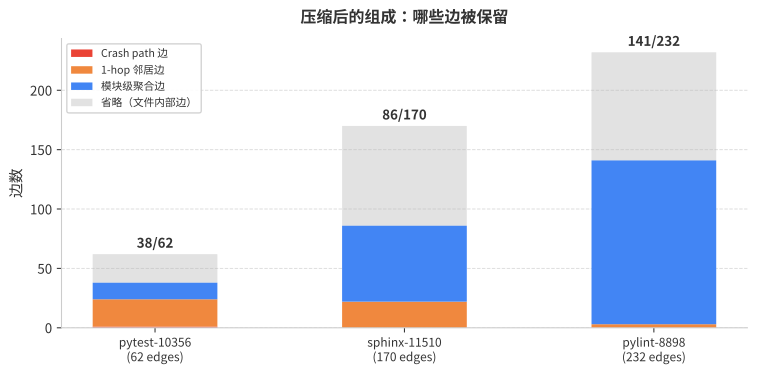
以 pytest-10356 为例,完整的压缩结果:
62 original edges
├─ Crash Neighborhood (24 edges)
│  ├─ 1 crash-path edge:
│  │    python.py::pytest_pyfunc_call → test_mark.py::test_mark_mro
│  └─ 23 neighbor edges (1-hop, sorted by call_count)
├─ Module View (14 cross-file pairs)
│  ├─ python.py → test_mark.py: 1 call, has_crash ✓
│  │   samples: ["pytest_pyfunc_call()->test_mark_mro()"]
│  └─ test_mark.py → structures.py: 11 calls, 3 function pairs
│     samples: ["test_mark_mro()->__call__()", ...]
└─ Internal (collapsed)
     structures.py: 14 internal edges
62 → 38 visible edges(38.7% 削减),crash path 完整保留。
| 实例 | 原始边数 | Crash 边 | 邻居边 | 模块边 | 保留边 | 削减率 |
|---|---|---|---|---|---|---|
| pytest-10356 | 62 | 1 | 23 | 14 | 38 | 38.7% |
| sphinx-11510 | 170 | 0 | 22 | 64 | 86 | 49.4% |
| pylint-8898 | 232 | 0 | 3 | 138 | 141 | 39.2% |
| requests-2931 | 27 | — | — | — | 27 | 0%(不压缩) |
≤50 edges 的图不压缩。 requests-2931 只有 27 条边,直接全量展示比压缩后更清晰。阈值 50 是经验值,在这个规模内 Agent 能直接消费完整调用图。
Agent 如何使用压缩调用图
压缩后的调用图以两个视图呈现给 Agent:
函数级视图(Crash Neighborhood): 直接列出 crash path 附近的函数调用关系和调用频次。Agent 用它定位”哪个函数调用链导致了崩溃”。
模块级视图: 列出跨文件的调用关系概要。Agent 用它理解”这个 bug 涉及哪些文件之间的交互”,然后决定用 PDB 在哪个文件设断点。
Agent 还有一个 expand_call_graph 工具,可以按需展开被压缩的内部边。压缩视图先给全局概览,Agent 需要细节时再展开特定文件。
踩坑记录
pytest_pyfunc_call 不覆盖 unittest.TestCase。 Django 测试用 unittest 风格,pytest_pyfunc_call 完全不触发。必须用 pytest_runtest_call,它在 pytest 协议栈中更高一层,覆盖所有测试类型。
Path.resolve() 在不同 CWD 下会给出不同结果。 tracer 输出的是相对路径,后续处理如果在不同工作目录下用 Path(rel).resolve(),会解析到错误的绝对路径。解决方案:统一用字符串模式匹配(site-packages、/lib/python),不依赖 resolve()。
Docker volume mount 会破坏预装环境。 用 -v host:/testbed 挂载后,镜像构建时的 pip install -e . 产物丢失,import astropy 直接失败,调用图采集拿到 0 条边。必须在挂载后重新 pip install -e /testbed。
P0 非用户代码过滤在实际中没有效果。 因为 tracer 层的 _is_user_file() 已经在采集时完美过滤了所有非用户代码。压缩阶段再做一次 P0 过滤,削减量为 0。这说明把过滤逻辑放在采集层是正确的。
交互式 Demo
下面是 4 个真实 SWE-bench 实例的压缩效果交互演示。可以切换实例、对比压缩前后的文本和图结构、查看压缩统计。
小结
动态调用图给 Debug Agent 提供了”运行时发生了什么”的信息,弥补静态分析的盲区。采集用 pytest hook + sys.settrace,精准控制在测试函数体执行期间,避免框架噪声。两层压缩(crash 邻域 + 模块级聚合)把大图压到 Agent 可消费的大小,同时保留全部 crash path 信息。频率过滤再削减约 50% 的文本量。在 4 个真实 SWE-bench 实例上验证了策略的有效性。